FALA System Devices
FALA devices allow you to purchase tickets and use the FALA System while travelling. Depending on the location, you can use a reader, a FALOMAT ticket machine or a railway FALOMAT ticket machine.
Reader
The reader allows you to register your boarding and automatically purchase a ticket by tapping your FALA Card or payment card. You can also scan the QR code from the FALA System app.
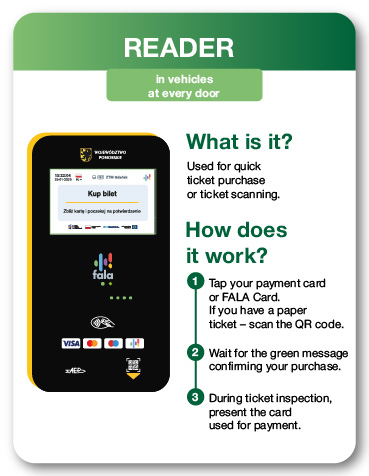
In Chojnice and Lębork, the reader is also used to register your exit from the vehicle.
FALOMAT Ticket Machine
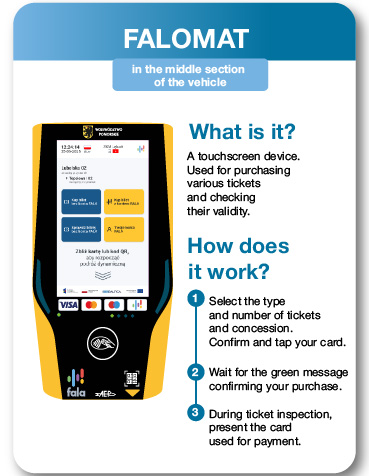
It is located halfway along the vehicle.
The FALOMAT is equipped with a touchscreen. You can use it to purchase a ticket, start your journey, and check your existing tickets and the available balance in your eWallet.
Railway FALOMAT Ticket Machine
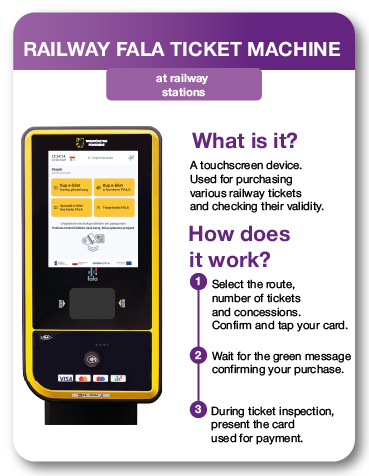
It is located at railway stations.
The railway FALOMAT is used to purchase train tickets and check their validity.
Every ticket purchased using a FALA device is an electronic ticket.
It is not printed by the device, and you will not receive a paper proof of purchase.
The ticket is stored in the FALA System – either in your FALA account or linked to the payment card used for the purchase.
The charge for the purchased ticket may appear in your bank account no earlier than 24 hours after the purchase.
Transaction details are also available in the payment history on the Customer Portal and in the mobile app.
Tapping the same FALA Card or payment card a second time ends the validity of the previously purchased ticket. Tapping it again starts the purchase of another ticket.
Using FALA Devices With or Without a FALA Account
Without an account: tap your payment card on the reader or FALOMAT ticket machine, or select "Buy a ticket without a FALA account" on the FALOMAT.
With an account: use your FALA Card, a payment card linked to your account or the QR code from the app. You can also select "Buy a ticket with a FALA account" on the FALOMAT.
What Should I Do if the "Card Reading Error" Message Appears?
Try tapping your card on the device again.
A successful purchase is confirmed by a green message, an audible signal and four indicator lights. If you are unsure, check your ticket using a FALOMAT ticket machine.
After purchasing a ticket, wait approximately 60 seconds.