Jak zamówić Kartę FALA?
Pokaż instrukcję dla:
Pierwszą Kartę FALA możesz zamówić:
- przez portal systemfala.pl
- Zaloguj się na stronie www.systemfala.pl
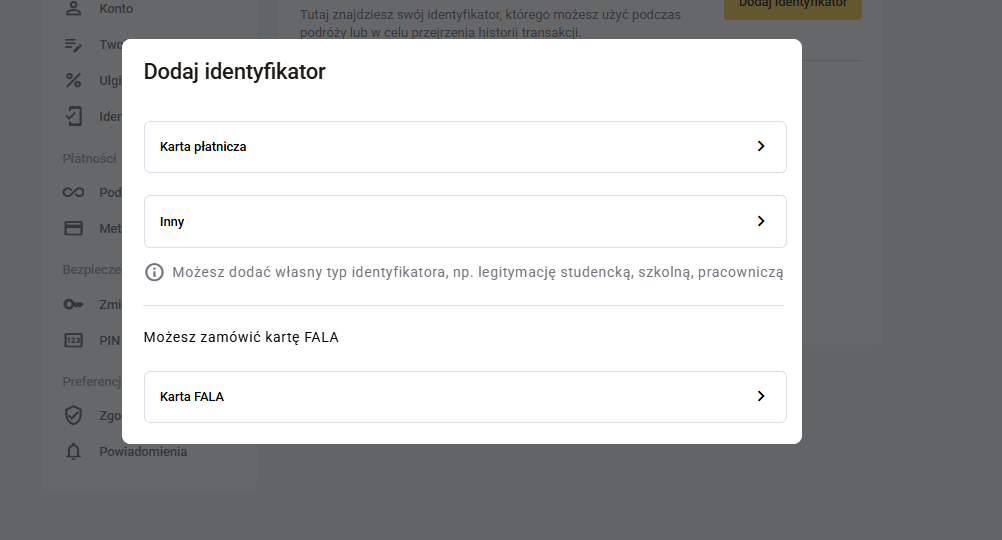
- Wejdź w zakładkę "Ustawienia", następnie "Identyfikatory".
- Kliknij "Dodaj identyfikator"
- Wybierz "Karta FALA" i postępuj zgodnie z dalszymi wskazówkami.
- w Punkcie Obsługi Klienta.
Jeśli posiadasz już Kartę FALA a chcesz zamówić następną - możesz ją zamówić w Punkcie Obsługi Klienta lub na stronie:
- Zaloguj się na systemfala.pl
- Wejdź w zakładkę "Zgłoszenia" następnie "Utwórz nowy".
- Wybierz kategorie wniosku "Wniosek o wydanie identyfikatora".