Czym są falomaty i czytniki (walidatory)?
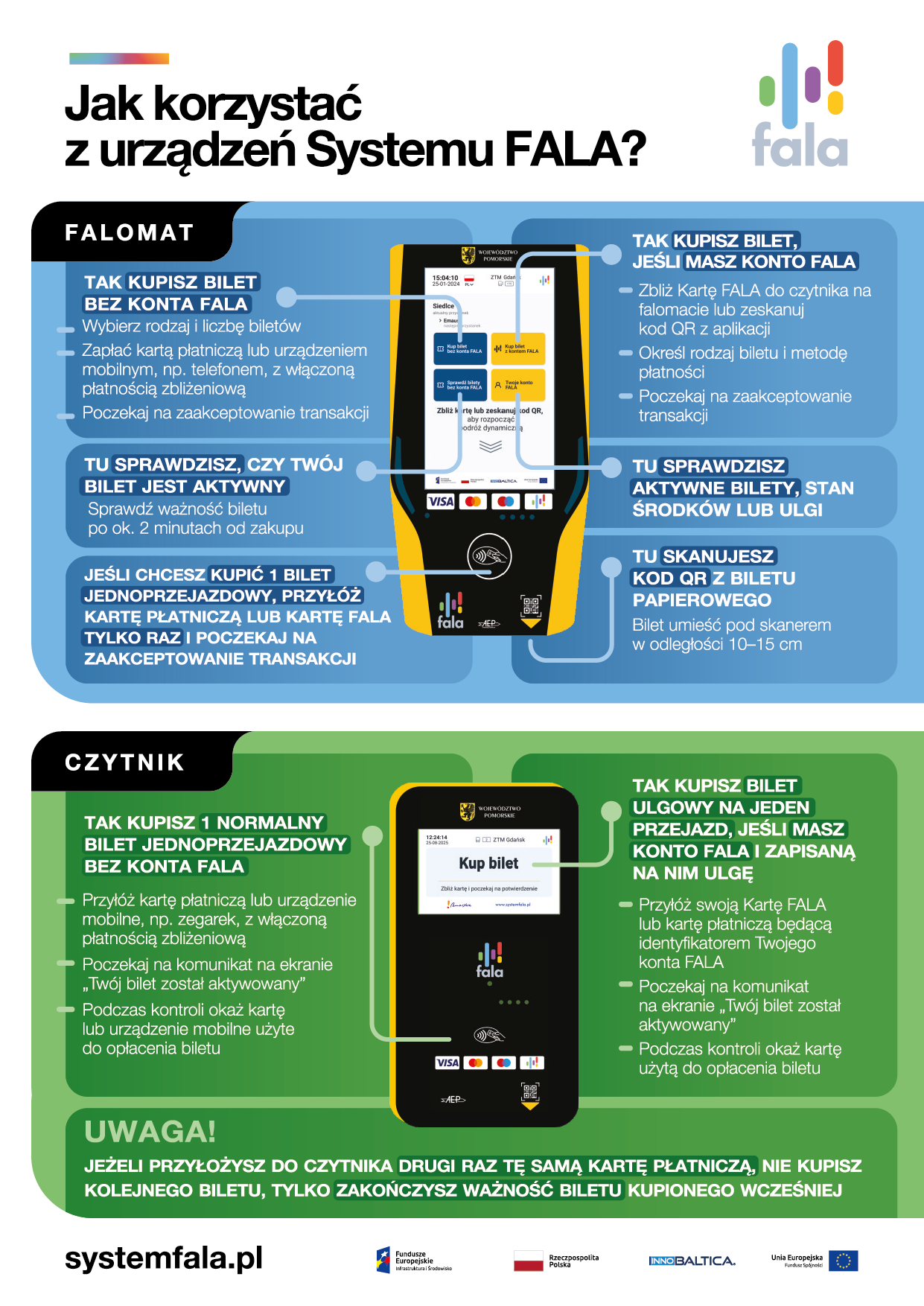
FALOMATY I CZYTNIKI to urządzenia Systemu Fala służące pasażerom do zakupu biletów. Każde urządzenie FALA oznaczone jest logotypem województwa pomorskiego oraz Systemu FALA.
1. Kto może korzystać z falomatów i czytników?
Z urządzeń FALA mogą korzystać zarówno osoby posiadające konto FALA, jak i te, które nie mają kont w systemie.
2. Do czego służą falomaty?
FALOMATY, czyli urządzenia z ekranem dotykowym znajdują się zazwyczaj w przestrzeni dla wózków – w połowie długości pojazdu i umożliwią przede wszystkim:
- Rejestrację wejścia/automatycznego zakupu biletu - poprzez zbliżenie Karty FALA lub karty płatniczej, co jest jednoznaczne z zakupem biletu (jeśli pasażer posiada ulgi przypisane do Konta FALA, zostaną one uwzględnione). Cena biletu zgodna jest z cennikiem obowiązującym w danym mieście.
Automatycznego zakupu biletu można również dokonać skanując QR kod z aplikacji (dostępny w lewym górnym rogu, po kliknięciu w zdjęcie). Ten QR kod jest również jednym z identyfikatorów w Systemie FALA, tak jak Karta FALA, czy karta płatnicza przypisana do konta FALA. Skaner kodów QR jest dostępny od spodu CZYTNIKÓW i FALOMATÓW (po prawej stronie urządzenia).
- Zakup dowolnie wybranego biletu z wykorzystaniem ekranu dotykowego:
- posiadacze konta FALA -> kupią bilet Kartą FALA płacąc środkami z ePortmonetki, poprzez przycisk „Kup bilet z kontem FALA”, jeśli chcą za bilet zapłacić kartą płatniczą muszą skorzystać z przycisku „Kup bilet kartą płatniczą”.
- osoby nieposiadające konta FALA -> kupią bilet płacąc kartą płatniczą, poprzez przycisk „Kup bilet kartą płatniczą”.
- Sprawdzenie środków dostępnych w ePortmonetce lub posiadanych biletów (poprzez przycisk „Twoje Konto FALA”)
W każdym przypadku pasażerowie kupują bilet elektroniczny, który się nie drukuje w falomacie oraz nie generuje się potwierdzenie zakupu. Oznacza to, że bilet jest przypisany do posiadanego konta FALA lub do karty płatniczej, którą dokonano zakupu. Informacja o dokonanych transakcjach zapisana zostanie w historii płatności klienta (w portalu systemfala.pl oraz w aplikacji).
3. Do czego służą czytniki?
CZYTNIKI znajdują się zazwyczaj przy każdych drzwiach pojazdu i umożliwią rejestrację wejścia/automatyczny zakup biletu poprzez zbliżenie Karty FALA lub karty płatniczej lub zeskanowanie kodu QR z aplikacji (dostępnego w lewym górnym rogu, po kliknięciu w zdjęcie pasażera). Jest to jednoznaczne z zakupem biletu (jeśli pasażer posiada ulgi przypisane do Konta FALA, zostaną one uwzględnione). Cena biletu zgodna jest z cennikiem obowiązującym w danym mieście.
W obu urządzeniach pasażer kupi e-bilet, czyli elektroniczny bilet dostępny w formie kodu QR lub kreskowego. Jest to nowoczesna, elektroniczna wersja tradycyjnego biletu papierowego.
WAŻNE! Przyłożenie do czytnika drugi raz tej samej karty płatniczej/Karty FALA nie powoduje zakupu kolejnego biletu, lecz skutkuje zakończeniem ważności kupionego wcześniej biletu, a przyłożenie trzeci raz skutkuje zakupem nowego biletu.